I'm choosing a Mac
You haven't bought one yet, or you want to know whether your Mac is enough.
Your first result
A shortlist of two Macs and the memory size you need.
Starts at chapter 1
A guide by Alex Grankin
Choose a Mac, set it up in an afternoon, and put private AI to work on your own files.
$99 until 8 November, then $149.
14-day refund if you’ve opened two chapters or fewer.

Who it’s for
The guide asks one question at the start and skips what you already know.
You haven't bought one yet, or you want to know whether your Mac is enough.
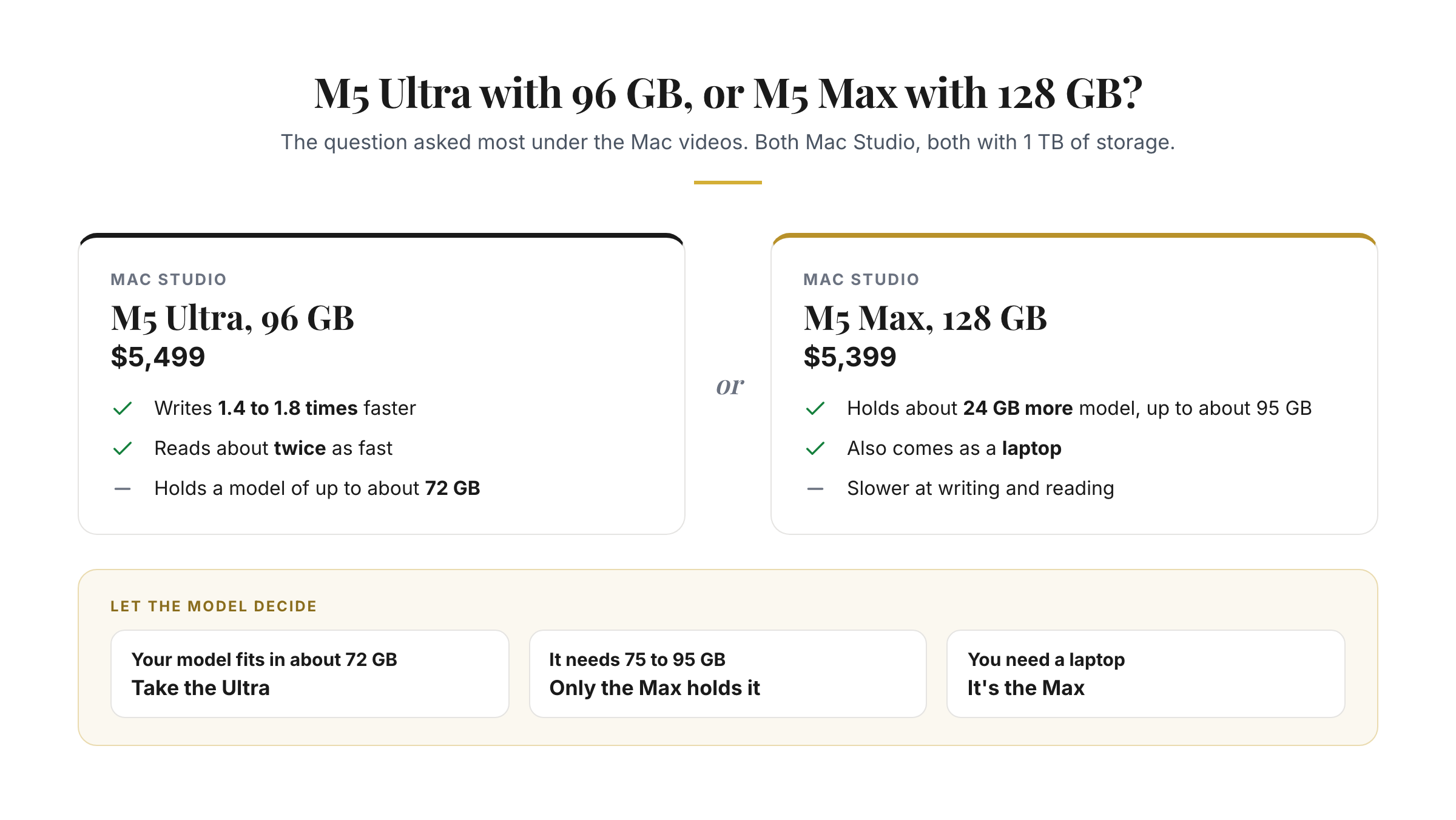
A shortlist of two Macs and the memory size you need.
Starts at chapter 1
You own the Mac you'll use and want it doing something useful.
A model answering on your Mac within 20 minutes.
Starts at chapter 3
LM Studio, Ollama or oMLX is installed and you want real work out of it.
Questions answered across a folder of your own PDFs within 20 minutes.
Starts at chapter 5
Look inside
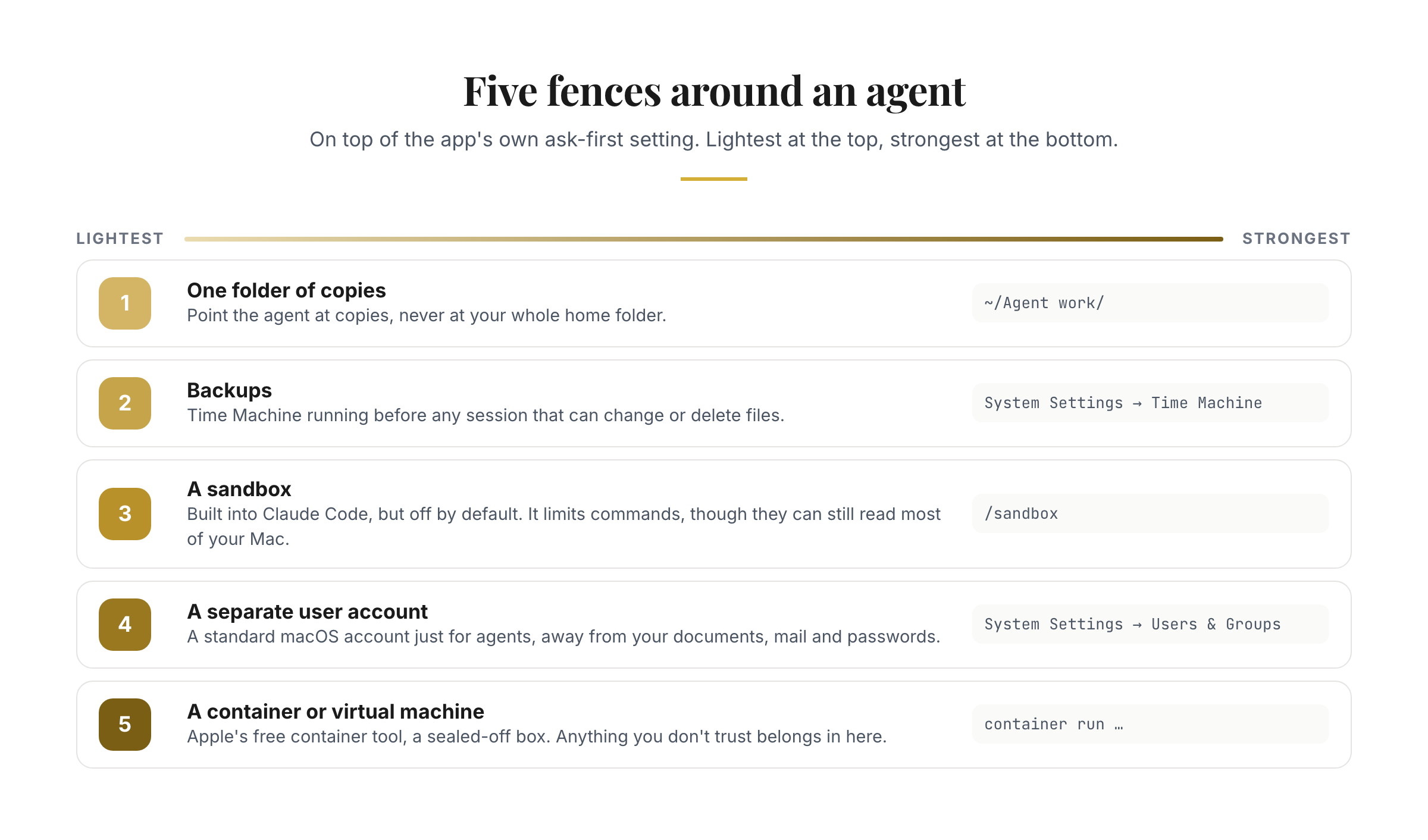
Nothing here was made for this page. These are 5 of the 52 figures and clips you get.
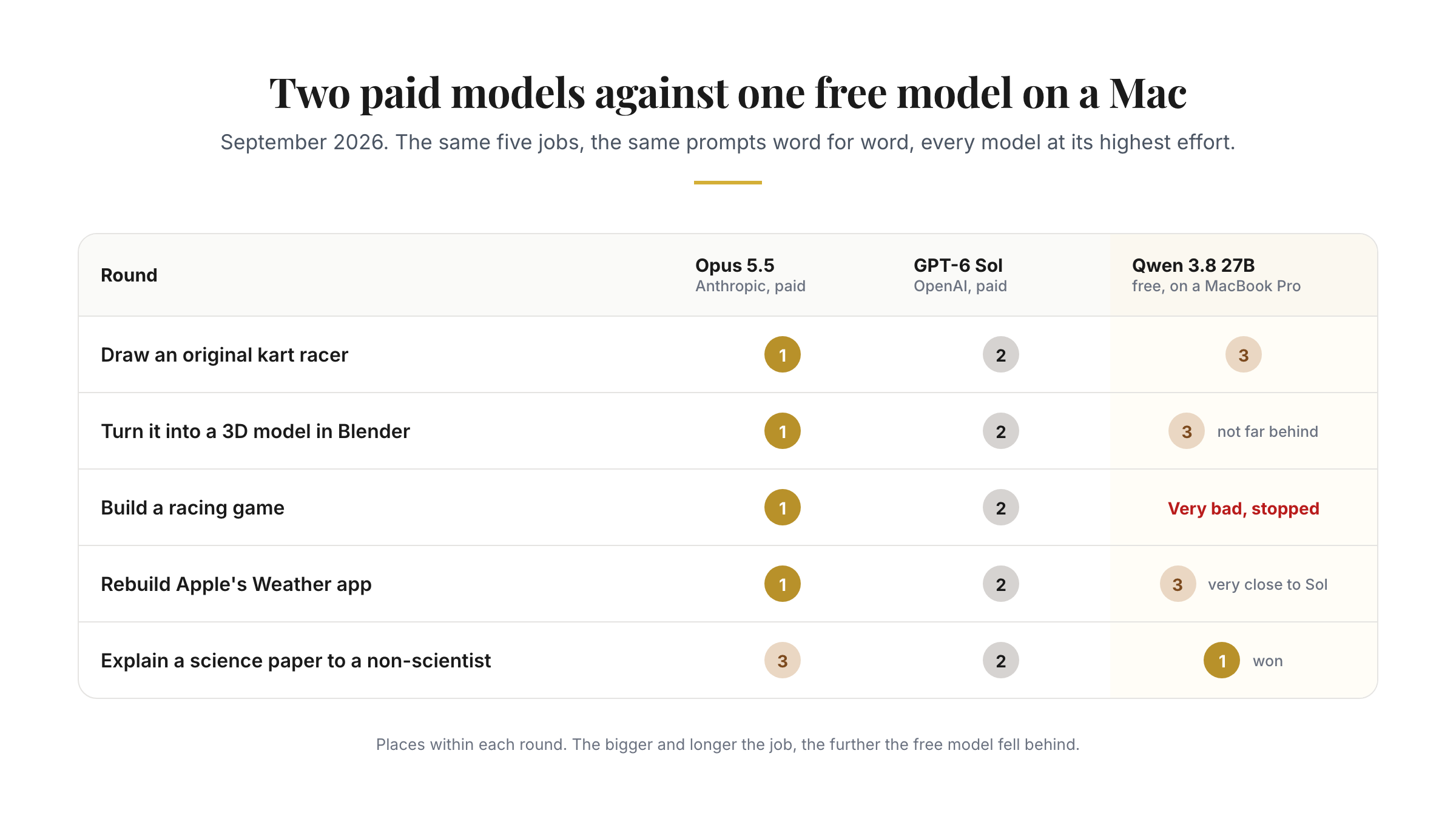
Free chapter
The chapter the Mac videos lead into. You’ll finish with a shortlist of two Macs and the memory size you need. If it works for you, the other ten will too.
Sent
Check your inbox
The link to chapter 2 is on its way to . It comes from hello@theaibridges.com, so check Promotions or spam if it isn’t there in a minute.
Your question, answered inside
The questions viewers ask most, and the chapter that answers each one.
“I have a 16-inch M4 with 24 GB. Is that enough to start, or do I need to upgrade?”
Chapter 2Pick the right Mac, or check the one you own“Is 32 GB the minimum?”
Chapter 2Pick the right Mac, or check the one you own“M5 Ultra with 96 GB or M5 Max with 128 GB?”
Chapter 2Pick the right Mac, or check the one you own“How do I get a model to read hundreds of PDFs?”
Chapter 6Hand it a pile of files“Does an Apple silicon app like oMLX make it faster?”
Chapter 9Make it faster“Can one Mac run AI for the whole office?”
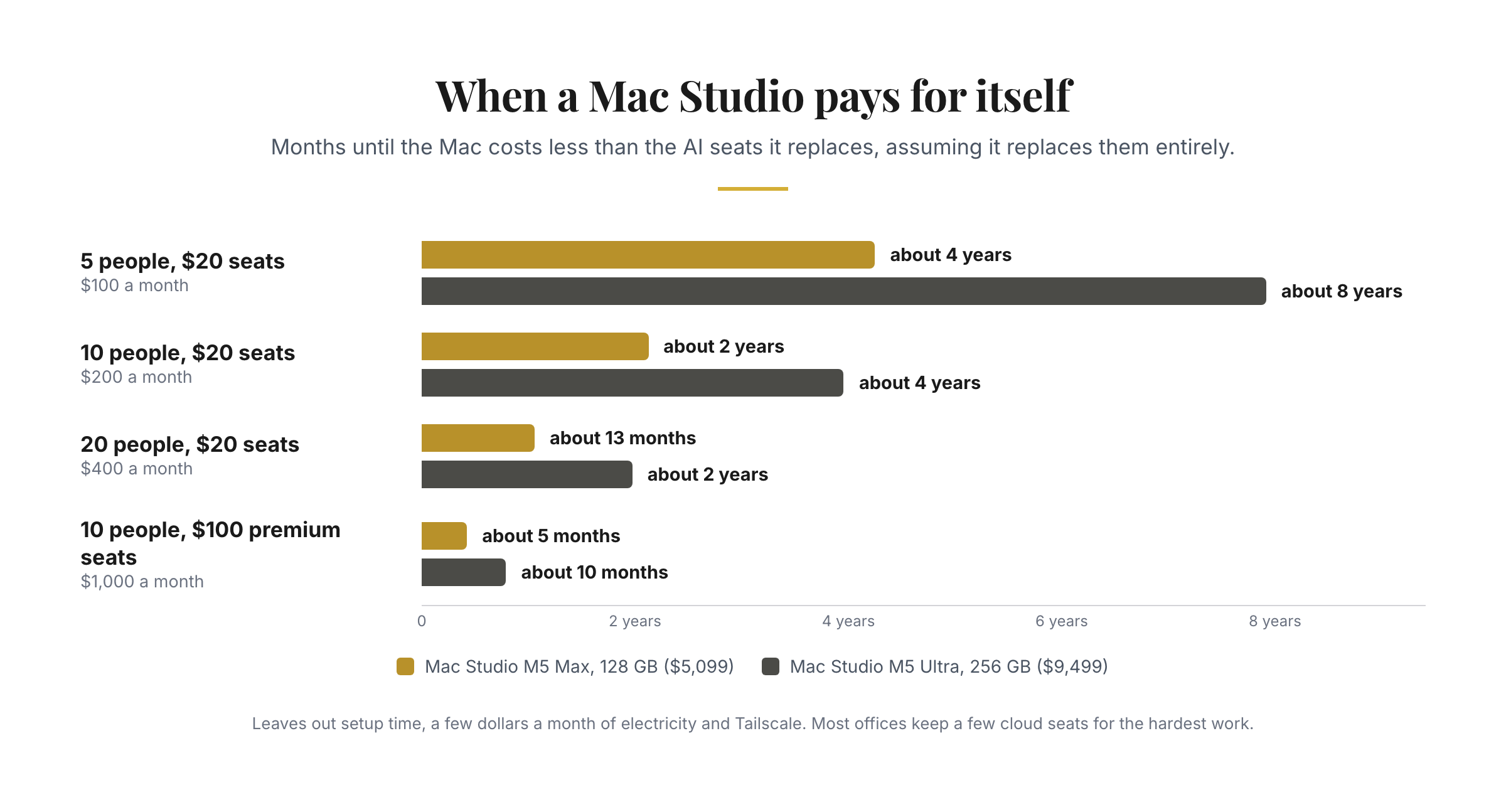
Chapter 11Private AI for a small office“$200 a month for a subscription, or $9,499 for a Mac?”
Chapter 1How local AI works, and what it's good forWhat’s inside
Plus a Start here page, 8 short Basics explainers and a glossary.
What runs on your Mac and why, what quantisation costs, and where the cloud still wins.
Four questions, a table by memory size, and answers to the choices people ask about most.
Your first model answering, with or without the Terminal.
Which model for your memory and your job, and how to judge a new one.
Everyday use, and questions answered across your own documents.
Hundreds of files processed in one go, often overnight.
Local models in Claude Code, Claude Desktop, OpenCode and Hermes Agent.
Prompt injection, permissions, add-ons and the other risks that matter.
The app, the format and the settings that change how fast it answers.
Local transcription, image models and video.
One Mac Studio a small team can share safely, and when it pays for itself.
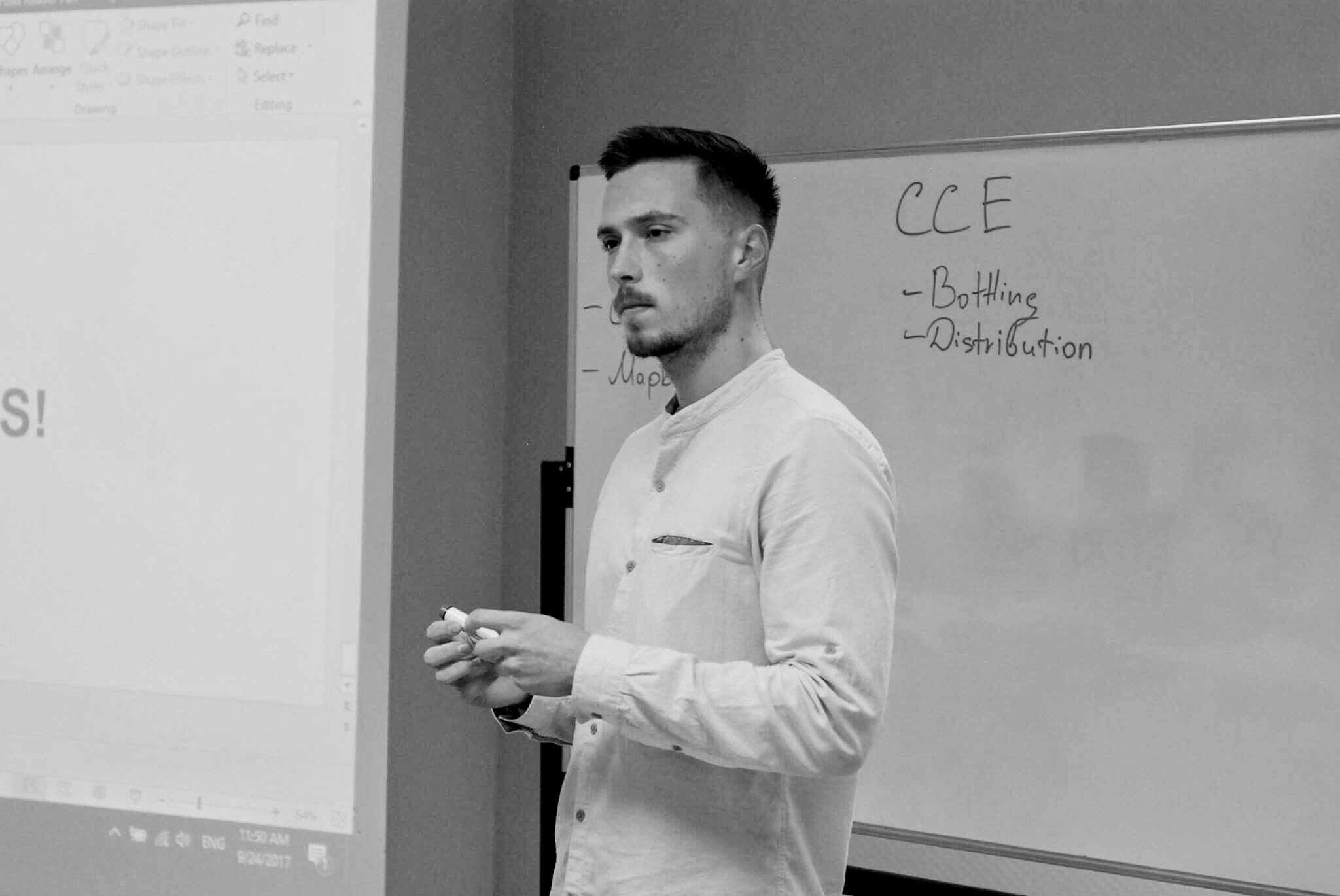
Who wrote it
I make the Mac and local AI videos on YouTube, and I built LLM Sizer, the free tool that shows which models fit which Mac. Before that I spent eight years across McKinsey, enterprise software and frontier AI.
The hands-on tests in the guide ran on my own MacBook Pro with the M5 Max, and the guide says where every other number comes from.
Three of the Mac videos
From readers of my other guide, Build With AI
“A friend recommended the ‘Build with AI’ Claude Code guide, and it changed how I work. Within a few weeks I was building skills, creating agents, and connecting MCPs for investment due diligence.”
 Oleg PavlovskyyInvestment Analyst & Founding Partner, Stockholm-based hedge fund
 “I never imagined that it would be useful in my day-to-day life or that I would ever be making graphics, websites, or simple apps in the matter of days.”
 Augustus Otto KindelStrategy, Top 10 US Bank
 Questions
Not for the first half. Setting up and chatting with your own files (chapters 3 to 5) happens in LM Studio, an ordinary app. The overnight runs in chapter 6 and the agents in chapter 7 use the Terminal, and every command is written out for you to paste.
Any Mac with Apple silicon, M1 or later. With 16 GB you can run small models. With 32 GB you can run Qwen 3.8 27B, the model the guide uses most. Chapter 2 has the table for every memory size and the cheapest current Mac for each.
The videos show what’s possible. The guide is the version you work through on your own Mac, in order: the apps, the settings, the prompts and the scripts, with 45 figures and 7 screen clips. Each chapter ends with a short exercise to try on your own Mac, from 10 to 30 minutes.
This is the October 2026 edition, written for the M5 Macs and the models out this autumn. When new Macs or models change the advice, I update the chapters and the edition date.
No. What you type and the files you give the model stay on your Mac. The apps go online only for model downloads, update checks and optional cloud features you can switch off. Chapter 3 shows which, and chapter 8 covers keeping agents safe.
For good. It’s online, so you can read it on any device and pick up where you left off.
You get a full refund within 14 days of buying if you’ve opened two chapters or fewer. Start here, the Basics explainers and the free chapter don’t count. Email alex@theaibridges.com from the address you bought with. The full policy is on the refund page. Read it here.
Stripe emails a receipt as soon as you pay. If you need an invoice with company details, email alex@theaibridges.com.
11 chapters, 45 figures and 7 screen clips, with a certificate when you finish.
$99 until 8 November, then $149.
14-day refund if you’ve opened two chapters or fewer.